Planar linkage simulator in your browser
Drop pins, connect links, add sliders — and watch your mechanism come alive. Powered by a Newton-Raphson constraint solver. No install, no account, no limits.
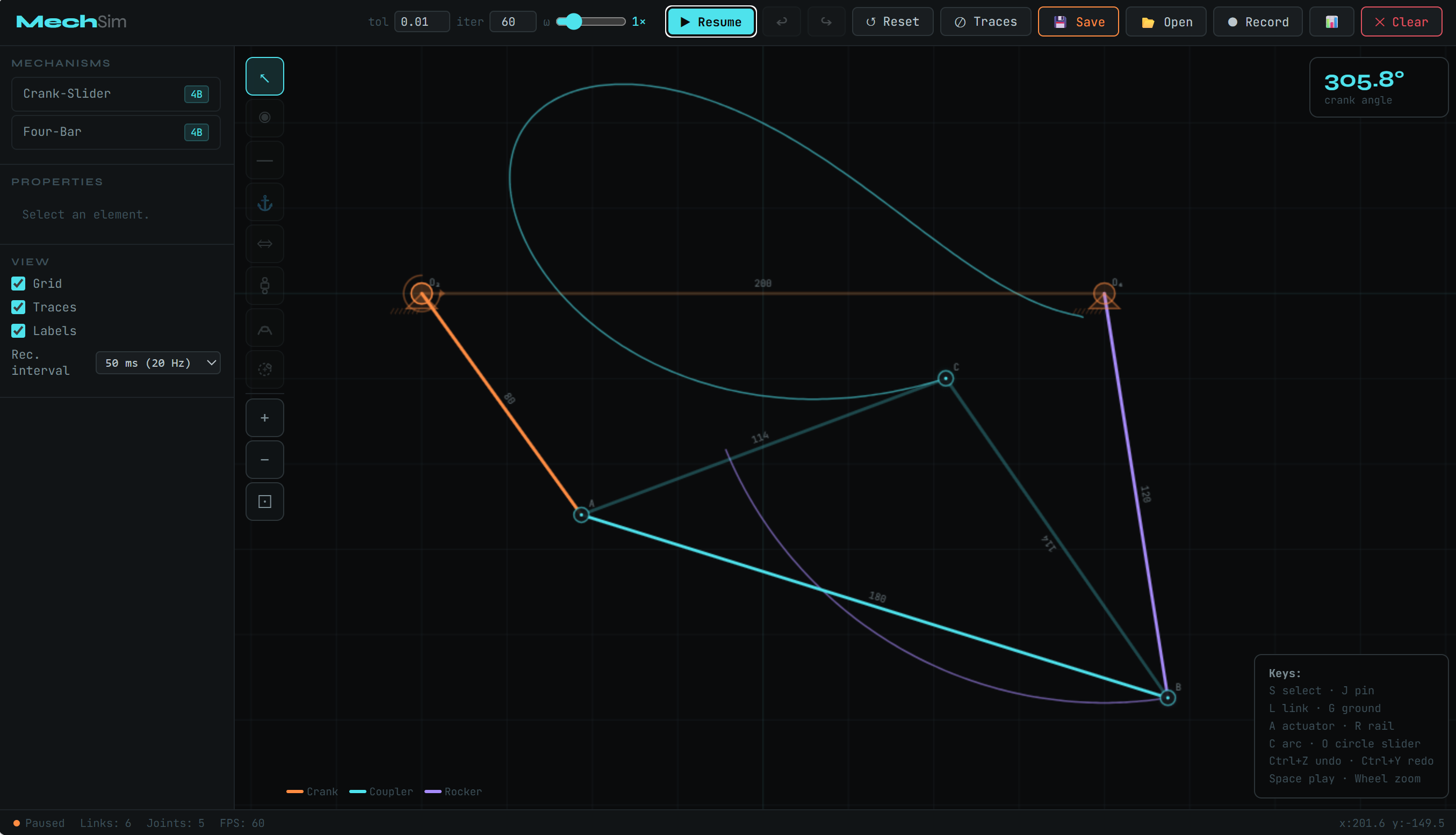
Everything you need to design linkages
MechSim runs entirely in your browser — no downloads, no account required. Build any planar mechanism from simple four-bars to complex multi-slider chains, then simulate, record, and export kinematic data.
Pin & Link Editor
Place grounded pivots, free joints, and connect them with rigid links. Drag to reposition, click to edit properties.
Rail, Arc & Circle Sliders
Linear rails, arc paths, and full circle sliders — passive or motor-driven. Mix slider types in a single mechanism.
Newton-Raphson Solver
Levenberg-Marquardt constraint solver resolves complex chains in real time. Configurable tolerance and iterations.
Data Recorder
Record position, velocity, and acceleration for any tracked joint. Export to CSV for analysis in Excel or MATLAB.
Trace Paths
Visualize coupler curves in real time. Enable trace on any pin to see the path it draws during simulation.
Save & Load
Download your mechanism as a portable .mechsim.json file. Reload anytime — no account needed.
Three steps to your first mechanism
Getting started with MechSim takes under a minute. The keyboard-driven workflow keeps you focused on the mechanism, not the interface.
Place ground pivots
Press G and click on the canvas to place two grounded pins. Set angular speed on one to make it the crank.
Add joints & links
Press J to add free pins, then L to connect them with rigid links. The solver auto-detects the chain.
Hit Play
Press Space and watch it move. Enable trace paths, record data, or adjust speed — all in real time.
Tools & keyboard shortcuts
Every action in MechSim has a keyboard shortcut. The tool palette covers all the primitives you need to build any planar mechanism — from simple four-bars to multi-slider assemblies.
-
◎Select SClick any pin or link to select it. Drag to move. Open the properties panel to edit length, speed, or toggle ground.
-
◉Pin JPlace a free joint anywhere on the canvas. Pins are the joints that connect links.
-
━Link LClick pin A then pin B to create a rigid link. Length is fixed at creation distance.
-
⚓Ground GToggle any pin between free and grounded. Set ω (rad/s) in the props panel to make it a crank pivot.
-
⇔Actuator ACreates a prismatic joint. Can be articulated piston or fixed-axis rail. Supports passive (coupler-driven) mode.
-
Rail Slider RTwo endpoints define a rigid rail. A slider pin S rides between them. Connect couplers to S for passive mode.
-
Arc Slider CSelect 3 pins (start → mid → end) to define an arc. Pin S slides along the circular arc.
-
Circle Slider OSelect center then rim pin. Pin S orbits the full 360° circle. Set speed for continuous rotation.
-
WWeld WRigidly fix two pins together. Useful for attaching extensions to existing joints without allowing relative rotation.
Work fast
Every tool has a key. Tools are disabled while Running or Paused — press Reset first to return to Edit mode.
Classic linkages you can build
The fundamental mechanisms of planar kinematics, all assemblable from pins and links in MechSim.
Crank, coupler, rocker, ground. Grashof's law governs whether it's a crank-rocker, double-crank, or double-rocker. Foundation of engines, wipers, walking machines.
Converts rotation to reciprocating linear motion. The foundation of piston engines and pumps. Built with a grounded crank, coupler, and a fixed-axis slider pin.
A four-bar where the coupler midpoint traces an approximate straight line — useful for converting rotation to translation without a prismatic joint.
Three slider types: straight rail, circular arc (3-point), and full 360° circle. Each slider pin can be passive (coupler-driven) or active (motor speed).
Build a four-bar from scratch
The four-bar is the simplest closed kinematic chain — three moving links plus the ground. It's the starting point for almost every mechanism you'll design.
Slider types: passive vs active
Understanding the difference between passive and active sliders is key to building complex multi-slider mechanisms.
Newton-Raphson constraint solver
Every link contributes a scalar equation f(q)=0. MechSim assembles the Jacobian and iterates using a Levenberg-Marquardt variant that prevents divergence near singular configurations:
The tol and iter inputs in the header control convergence. Lower tol = more precise. Higher iter = handles complex configurations.
Simulation state machine
Common questions
.mechsim.json file. Click 📂 Open to reload it. No account needed — fully portable. Save files include geometry, link lengths, slider configs, background image reference, and all simulation settings.Active: slider moves at a set speed, bounces at limits, and its pinS is treated as a fixed anchor that drives downstream passive joints.
.csv — timestamps start at zero for easy analysis in Excel, MATLAB, or Python..mechsim.json file.Start building mechanisms now
Free, browser-based, no installation. Works in Chrome, Edge, Firefox and Safari.
▶ Launch Simulator